Day 3 — The Most Important Screen in the App
by the_chandi_man | 22 May 2026
There's one screen in this app that matters more than any other.
Not the feed. Not the leaderboard. Not the competition setup. The scorecard screen — the one you'll have open on every hole of every round you play. The one you're staring at when you're standing over a 6-footer for par and your mate is waiting to enter his bogey.
That screen got built today.
But first — it runs.
IT RUNS. 👀
After two days of fighting the Android emulator, I found a way forward. .NET MAUI supports Windows as a target platform and it turns out my laptop works just fine as a test device.
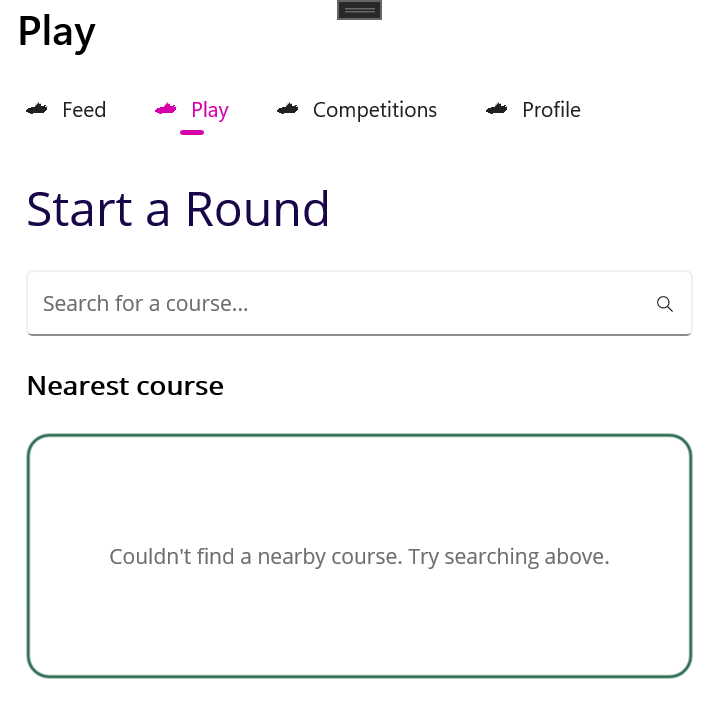
And there it is. The app. Running. On a screen.
Four tabs along the top — Feed, Play, Competitions, Profile. The Play tab open showing the Start a Round screen. A search bar. A nearest course card showing "Couldn't find a nearby course" — because the GPS service is still stubbed, the app doesn't know where it is yet.
It's not pretty. The pink colour scheme is MAUI's default theme — we'll replace that with something that actually looks like a golf app soon enough. But the structure is right. The navigation works. The screens are there.
Seeing it run for the first time is a moment. Even on a Windows desktop. Even with a pink theme and a stubbed GPS service. It exists. It's real.
The Android phone test is still on the list — I want to hold it in my hand on a real mobile device. But today I got to see it, and that matters.
What the Scorecard Screen Does
Now — the screen that got built today.
At the top, hole information — hole number, par, stroke index, yardage. Everything you need to know about the hole you're standing on, right there. Swipe left or right to move between holes, or tap the arrows if you prefer.
In the middle, your players. Everyone in the group, their score for the current hole, their running total versus par, their Stableford points. All of it visible simultaneously — you never have to switch views to see both your gross score and your points.
At the bottom, the number pad. This is the bit I feel strongly about.
One tap. Any score. Done.
I've used apps that make you tap a + button repeatedly to get to your score. On a par 4 where you made a 7, that's seven taps. Seven taps while wearing a glove, standing on a slope, with three other people waiting. That's not a golf app, that's a punishment.
Our number pad has every score from 1 to 10 as a single tap. Plus a backspace to correct mistakes. Plus an NR button — big, red, impossible to miss — for when you pick up your ball and need to record a no result.
The moment you tap a score, it colours up. Birdie goes green. Bogey goes amber. Double bogey goes red. Eagle goes blue. You see the result instantly — no waiting, no calculating.
Stats Tracking
Remember the toggle from Game Setup? If you opted in to stats tracking for the round, you get an extra row on the scorecard. Putts — tap 0, 1, 2, 3, or 4+. Fairway in regulation — tick or cross (hidden on par 3s, which don't have fairways). Green in regulation — tick or cross.
If you didn't opt in, none of that appears. Clean screen, no friction, just the score.
That's the right approach. Some rounds you want the data. Some rounds you just want to play golf and go for a pint. The app doesn't force a choice.
What the Flow Looks Like Now
In three days of building I now have a complete end-to-end round setup flow:
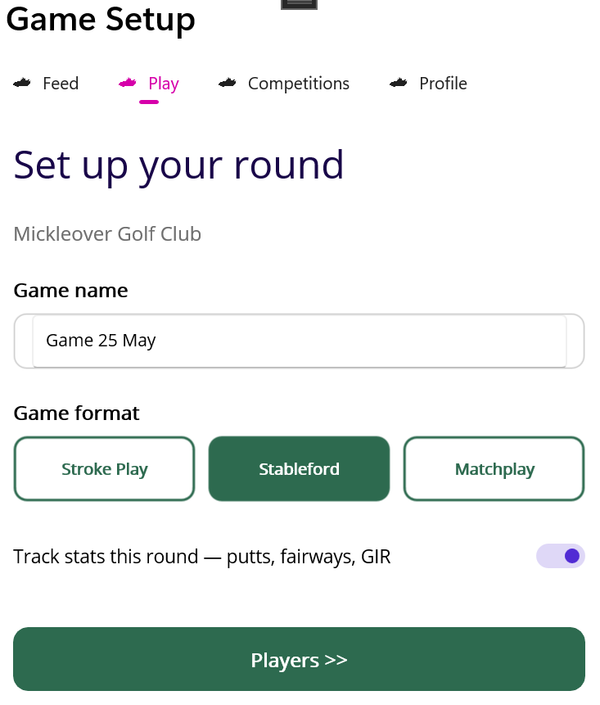
Select your course → Choose your holes → Set up the game → Add your players → Score your round
None of it is connected to live data yet. The course search returns test data. The GPS nearest course is stubbed. The players list has a test player in it. But the structure is there, the navigation works, and the screens are built.
A Quick Note on How This is Being Built
A few people have asked about the AI tools involved. Here's the honest picture.
I'm using two things. This Claude conversation — where I work through decisions, update the specification, and write these blog posts. And Claude Code — a terminal tool that writes code directly into the project files when I describe what I want.
The scorecard screen took one detailed instruction and about three minutes. That would have been a day's work five years ago.
I'm not pretending I'm not using AI tools. That would be dishonest and also pointless — anyone building software in 2026 who isn't using them is making their life unnecessarily hard. What I am doing is making sure I understand every decision, every architectural choice, every piece of code that goes in. The AI writes it. I own it.
That's the right way to do this.
The Reality of Building on the Side
I want to be honest about something.
Building this around a full time job is hard work. Even with AI tools doing the heavy lifting on the code, the thinking, the decisions, the writing — that still takes time and energy that has to come from somewhere. Usually from the evenings. Sometimes from the weekends.
I started strongly over the weekend. Full days, real momentum, a lot got done. Then the week hit and the pace slowed. A couple of days where barely anything moved. That's just reality.
But here's what I've come to realise — it doesn't matter. What matters is that we keep moving forward. One screen at a time. One session at a time. Even on the slow days, something gets done. And over time that adds up to something real.
The goal hasn't changed. Build something that golfers actually love. Something I can be genuinely proud of. Not because it made money or got acquired or went viral — but because it solved a real problem for real golfers who play the game the way I do.
That's enough of a reason to keep going.
For the love of the game. 🏌️
Where We Are
✅ Complete backend API — players, courses, rounds, competitions
✅ Full round setup flow — five screens, end to end
✅ Scorecard screen — number pad, score colours, Stableford, stats
✅ App running on Windows — first visual confirmed
⏳ Real device test — tomorrow
⏳ Post-round flow — round complete, stats summary, feed post
⏳ Connect to live data
The app is taking shape. Time to find that phone. 🏌️
Follow the journey: Blog: thechandiman.com Instagram: @the_chandi_man Threads: @the_chandi_man X: @thechandiman1